

Guidance on broadband speeds
Broadband can feel more complicated than it needs to be. A fast connection into your home does not always mean you will have strong Wi-Fi in every room - and slow Wi-Fi does not necessarily mean there is a problem with your broadband service.
This guide explains how the broadband connection, your router and Wi-Fi work together; why Wi-Fi coverage can change when you move from copper to fibre; and how the way people use the internet at the same time affects the experience at home.
It also shows you how to test broadband and Wi-Fi separately, understand what the results are telling you, and take practical steps to improve coverage around your home.
The aim is simple: to help you make the right choice when selecting your broadband speed and, if you're experiencing slow speeds, work out what is actually causing a problem before you change your broadband package, equipment or provider.
Getting to know broadband speeds
A faster broadband package gives your household more capacity, but it does not automatically make Wi-Fi stronger in every room.
Equally, excellent Wi-Fi cannot create more capacity than the broadband connection provides.
A more useful question than “what is the fastest broadband I can buy?” is: “Is my broadband connection fast enough for what we do at the same time, and is my Wi-Fi delivering that connection properly around the home?”
If you're moving to fibre broadband
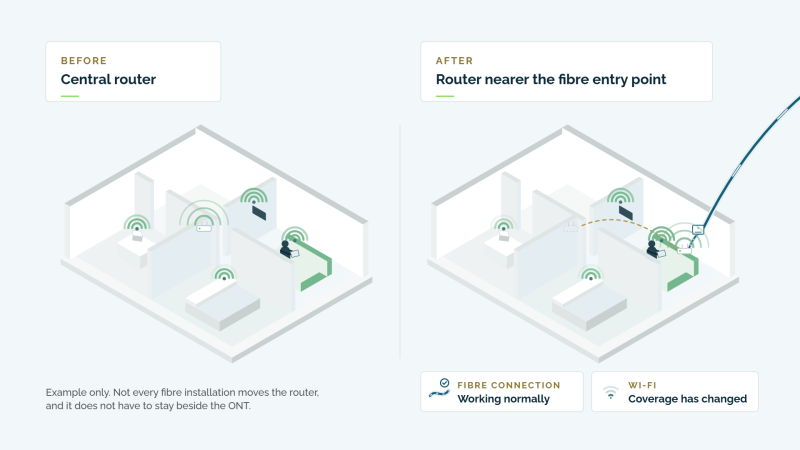
Before a fibre installation ask where the ONT will be fitted, where the router will sit, whether that position is likely to provide Wi-Fi coverage to the rooms you use most, and what options are available if the preferred router position is elsewhere.
What should I agree before the installation?
Before work starts, it is worth discussing where the new fibre equipment will go. In particular, ask:
- Where will the fibre enter the property?
- Where will the ONT be fitted? The ONT is the small unit where the fibre connection terminates inside the home.
- Where will the router be positioned?
- Is that a good position for Wi-Fi? A router near one edge of the property may not serve rooms at the other end as well as a more central position.
- Are there other options? Depending on the installation, it may be possible to use Ethernet cabling so that the router or an additional Wi-Fi access point can be positioned somewhere more suitable.
The best place for the fibre to enter your home is not necessarily the best place for your Wi-Fi router.
What should I check after fibre is installed?
Once the new connection is live, check Wi-Fi in the places where you actually use it — not just beside the router.
Try your phone, tablet or laptop in rooms such as the lounge, bedroom or home office and compare the experience with the areas close to the router.
If the broadband connection is performing well near the router but Wi-Fi is noticeably poorer elsewhere, the issue may be coverage rather than the fibre connection itself.
Possible solutions can include:
- repositioning the router where practical;
- connecting equipment using Ethernet;
- adding a suitable Wi-Fi access point or mesh system;
- repositioning existing Wi-Fi equipment.
Buying a faster broadband package will not necessarily improve weak Wi-Fi coverage.
Understand how different internet activities use your internet
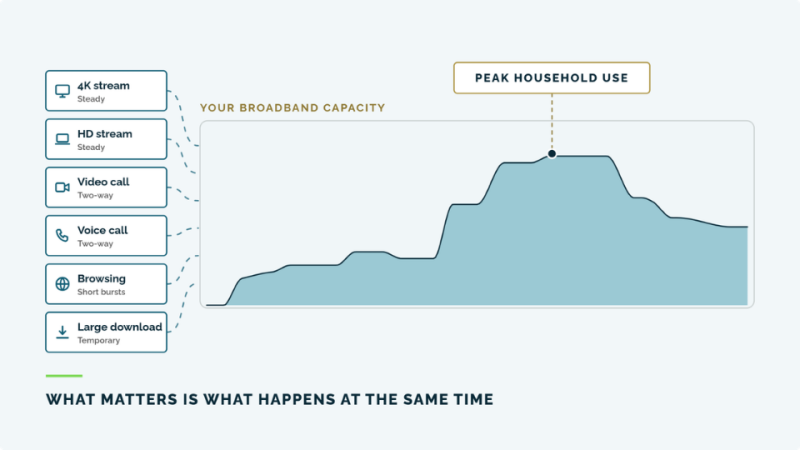
Your broadband connection is shared between the activity happening in the home at that moment. Different activities use that capacity in different ways.
This is why the number of devices in the house is not a good guide on its own. A home can have twenty devices connected but only a few doing anything substantial. At another moment, three people can create much more demand if two are streaming high-quality video while someone else is on a video call and a large download starts in the background.
What are your speed tests telling you?
A speed test is most useful when you compare results rather than looking at one number in isolation. Testing close to your router gives you a useful starting point. Repeating the same test in the rooms where you actually use the internet can then show how your Wi-Fi changes around the home.
If performance is good close to the router but falls away in another room, the broadband connection itself may be working well and the issue may instead be Wi-Fi coverage. Walls, floors, distance from the router and the construction of your home can all affect how far the wireless signal travels.
If results are poor even when you are close to the router - and particularly if a wired test is also poor - it is more likely that you should look at the broadband connection itself or speak to your provider.
If your tests suggest that Wi-Fi coverage is the problem, the next step is to look at how the signal can be improved around your home.
Broadband and Wi-Fi: the key things to remember
It is possible to pay for more broadband capacity than your household actually uses. Before moving to a faster and potentially more expensive package, it is worth understanding what your household does online, what happens at the same time, and whether any problem you are experiencing is really with the broadband connection or with the Wi-Fi around your home.
A good way to think about it is:
Pay for the broadband capacity your household genuinely needs - and make sure your Wi-Fi is allowing you to use it properly.
Do I really need a faster broadband package?
Different online activities place very different demands on the broadband connection.
Streaming tends to create a steady demand. Video calls remain active while the call continues. Browsing, email and messaging generally happen in shorter bursts. Large downloads can use a lot of capacity temporarily and then stop.
The important point is not simply how many devices you own.
It is what people are doing at the same time during the busiest part of the day.
If your broadband connection is performing well but Wi-Fi is weak in one room, paying for a faster broadband package may not solve the problem.
First look at:
- router position;
- distance;
- walls and floors;
- interference;
- the device being used;
- whether additional Wi-Fi coverage is needed.
A faster package mainly provides more capacity into the home. It does not automatically make the wireless signal travel further.
Is the problem broadband or Wi-Fi?
Your broadband connection brings the internet to your home and router.
Wi-Fi is the wireless connection between your router and devices such as phones, televisions, tablets and laptops.
A fast broadband connection can therefore be working correctly while Wi-Fi is poor in one part of the house.
Buying a faster broadband package will not necessarily fix weak Wi-Fi coverage.
Start by testing close to your router.
Then repeat the test in the rooms where you normally use the internet.
If possible, a wired Ethernet test can provide a useful baseline for the broadband connection itself.
The SpeedChecker app can also help you compare the internet connection and the Wi-Fi connection around your home.
Look for a pattern, rather than concentrating on one individual test result.
Router position matters
Wi-Fi starts at your router, so where the router is positioned can make a significant difference.
A router in a central, open position will usually have a better chance of reaching more of the home than one placed at an edge of the property, behind furniture or surrounded by thick walls.
Distance, floors, interference and the construction of the property can all weaken the signal.
If you're moving to fibre broadband
A fibre installation can change where your router is located.
The fibre normally terminates at an ONT (Optical Network Terminal), and the router connects to it. Depending on the installation, the router may end up somewhere different from its previous position.
Before the installation is completed, ask:
- where the ONT will be fitted;
- where the router will sit;
- whether that position is suitable for Wi-Fi;
- what options are available if a better router position is needed.
The best place for the fibre to enter the property is not necessarily the best place for Wi-Fi to start.
How can I improve Wi-Fi coverage?
A Wi-Fi extender can only pass on the signal it receives.
One of the most common mistakes is to put the extender in the room where Wi-Fi is already very weak.
Instead, position it between the router and the weak area, while it can still receive a good signal.
Then test again.
A useful rule is:
Test → Position → Test again → Adjust
A mesh system uses several Wi-Fi points around the home that work together.
This can be useful in:
- larger homes;
- multi-storey properties;
- long or wide single-storey homes;
- properties with thick stone or granite walls.
Mesh equipment still needs to be positioned sensibly. Putting a mesh unit where the connection is already very poor can limit how well it works.
Where suitable cabling is available, a wired Wi-Fi access point can sometimes provide an even stronger solution.
When should I speak to my broadband provider?
Contact your provider if:
- wired and Wi-Fi tests are both consistently poor;
- performance close to the router is substantially below what you would reasonably expect from your service;
- the connection regularly drops altogether;
- restarting the equipment does not help;
- you believe there may be a fault with the broadband connection itself.
If performance is strong near the router but poor only in particular rooms, the issue is more likely to be the Wi-Fi inside the property.
Remember
More broadband speed is only useful if your household needs the extra capacity. Test your connection, understand your busiest periods and check your Wi-Fi before paying for more.